Steps
-
Open the Gifts tab, then tap « My gifts », under your balance.
-
Spot your gift: name, date, points spent and status.
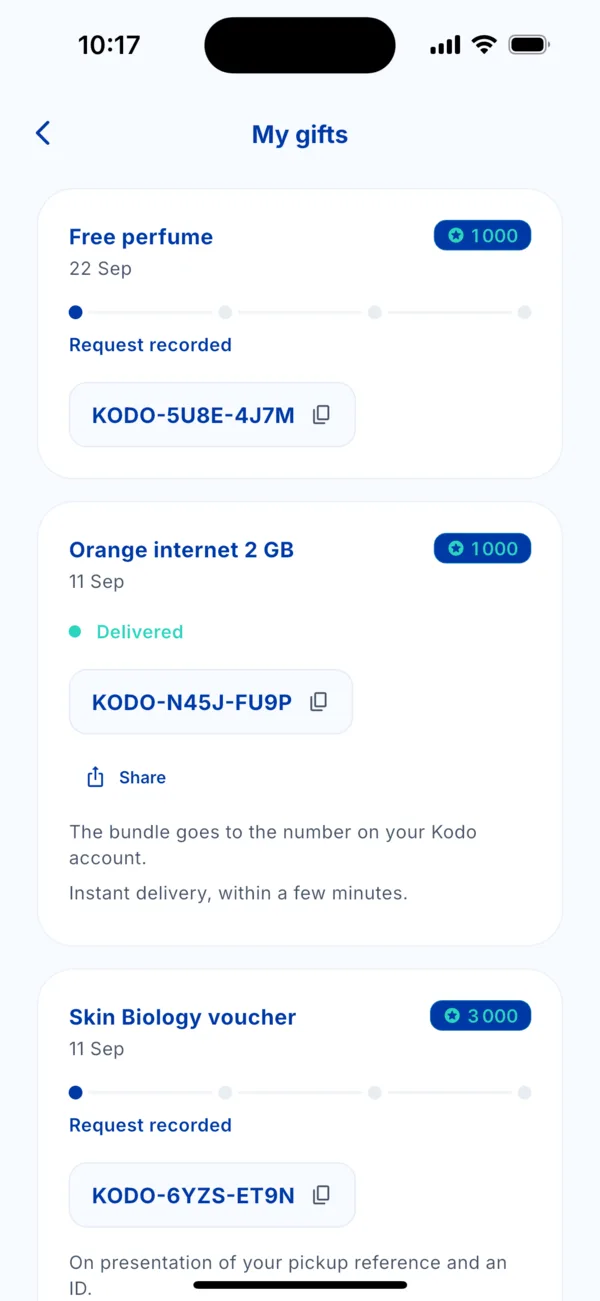 The « My gifts » list
 -
Copy the reference (in the form KODO-XXXX-XXXX) with the icon next to it, or tap « Share ».
-
Use it as indicated under the card.
The statuses
- Request recorded: your request is taken into account, the rest is under way.
- Delivered: the gift has arrived.
How to use it
- Internet bundle: it goes to the number of your Kodo account (or the one you entered). Immediate delivery, within a few minutes.
- Partner gift: show your pick-up reference and an ID, as the card says.
- Perk: activate it from the gift, it applies without spending points.
If it doesn't work
Nothing arrives after a while? Write to us with the reference: see « Contact Kodo support ».