Your Kodo secret code
It is a 4-digit code that you choose when you create your account. It is used to open Kodo and to confirm your payments. It is always available, even if you use Face ID or fingerprint. Avoid your date of birth.
Change it
-
Open the Account tab, « Verification methods » section.
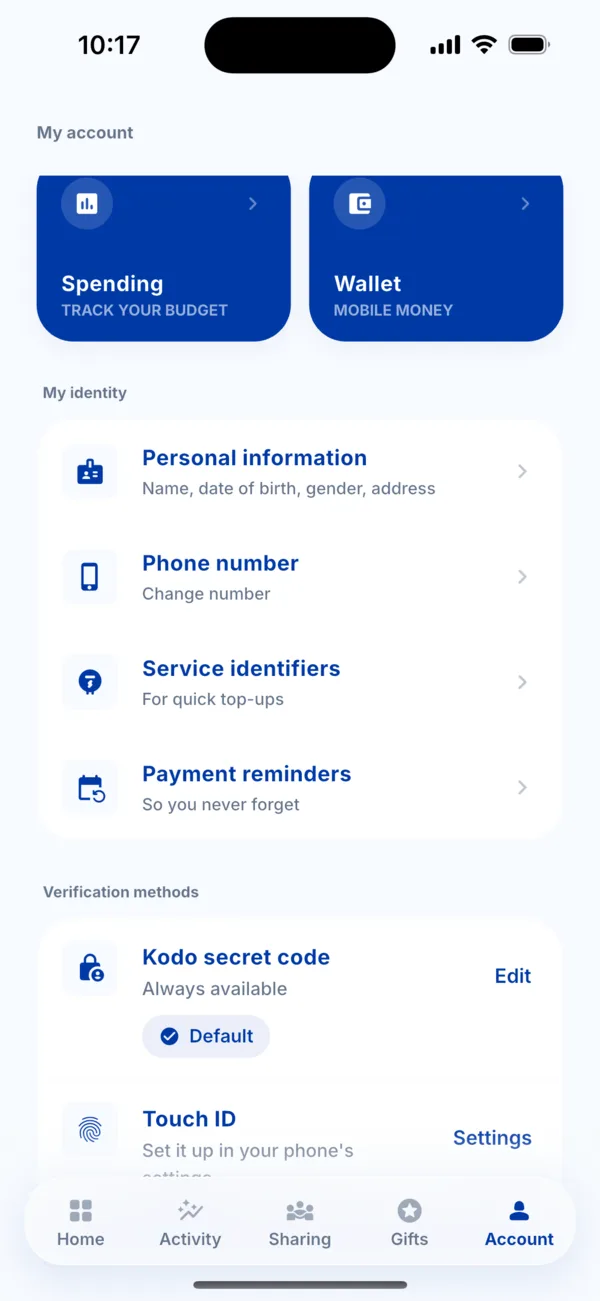 The verification methods in Account
 -
Tap « Edit » next to « Kodo secret code ».
-
Enter your current PIN, then choose a new PIN and confirm it.
-
Kodo shows « PIN changed ».
Face ID or fingerprint
They are set up in your phone's settings: tap « Settings » next to « Face ID » or « Touch ID ». Once on, Kodo offers to use them to unlock the app and confirm your payments. Your PIN can still be used at any time.
Forgotten or blocked PIN
- Tap « Forgot your PIN? », verify your number by WhatsApp, then create a new PIN.
- After several wrong attempts, Kodo warns you (« you have … attempts left ») then locks the PIN for 15 minutes. Create a new one with « Forgot your PIN? ».