Steps
-
Open Kodo and tap Get started. You can skip the introduction.
-
Choose the country where you live and enter your WhatsApp number. Tick the box to accept the terms of use and the privacy policy.
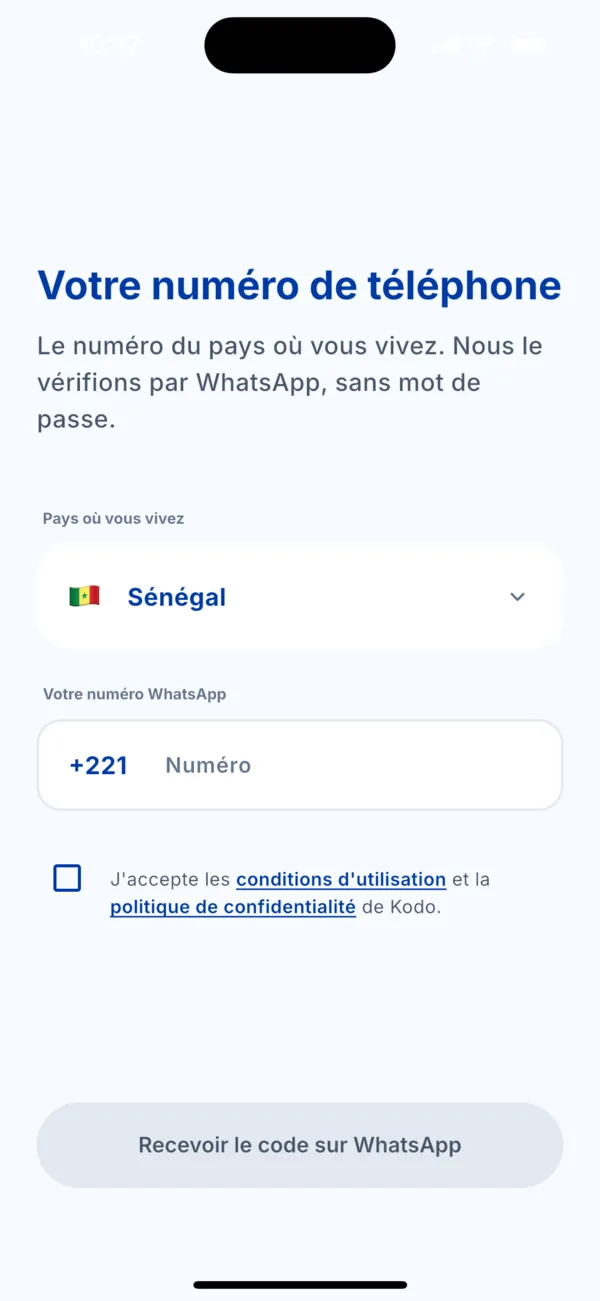 « Your phone number » screen
 -
Tap « Get the code on WhatsApp ». WhatsApp opens with a message already written. Send it without changing it.
-
Come back to Kodo. The « Waiting for your WhatsApp message » screen closes by itself as soon as the message is received.
-
Complete your profile: first name, last name, date of birth and gender. If a loved one invited you, you can enter their referral code (optional, and only before your first payment).
-
Create your PIN, 4 digits, then confirm it. Avoid your date of birth.
-
Allow what you want: Face ID or fingerprint to open Kodo faster, notifications, contacts. All of it is optional: tap « Later » if you are unsure.
Your account is ready. A welcome gift of points is added to your balance.
If it doesn't work
- The WhatsApp message doesn't arrive or the check fails: see the article « The WhatsApp sign-in message doesn't work ».
- « This number is already linked to another Kodo account »: you already have an account. Sign in with this number instead of creating a new one.
- A message says the account is blocked: write to us on WhatsApp at +221 78 786 31 31.